


Solitaire Game:Classic Card
4.6727.00 Reviews
App Specs
- Version
- 2.7.0
- Updated On
- License
- Free
- Downloads
- 500,000+
- Developer
- ECKERT GAMING
- Categories
- Puzzle
- Platform
- Android
Screenshots
 Analysis by AppCompare
I reach for a solitaire game when I want a small break that asks for a little attention without demanding a whole evening. Solitaire Game: Classic Card is aimed squarely at that mood: it brings familiar card play to a phone, where I can start a round, think through a few moves, and put the device away when life interrupts. Its appeal is less about changing what solitaire is and more about making the familiar routine easy to pick up.
A quick game that still feels like a game
Klondike gives a short session a natural shape: each move can open up another choice, but a deal can also reach a point where there is little left to do. That uncertainty is part of the appeal. I can make a few deliberate moves while waiting for a bus or settling into a quiet moment, rather than needing a long, uninterrupted stretch to get anything out of it.
The choice between drawing one card and drawing three makes a practical difference to that rhythm. One-card draw is the gentler option when I want to keep the pace easy and see more possible moves. Three-card draw asks me to plan around a tighter stock sequence, so it suits a session when I want a little more resistance. I would choose based on the attention I have available, not assume one mode is automatically better.
That flexibility also makes the game approachable for different levels of familiarity. Someone who knows the basic rules can settle in quickly, while a returning player can use hints when a layout stops making sense. I would treat a hint as a nudge to inspect the board, not as an instruction to tap through every suggested move; pausing to work out why it helps keeps the puzzle satisfying.
Small choices that improve a casual routine
The useful trick with mobile solitaire is to keep a round at the right scale. If I have only a minute, I can make a couple of moves and stop rather than forcing myself to finish. If I have longer, I can follow the board more carefully and use undo to test a choice that might block a column. That makes undo more than a rescue button: it can help me learn which move opened options and which one narrowed them.
Daily challenges give regular players a reason to return, but they are not essential to enjoying the core game. I would use them when I want a prompt or a change from choosing a standard deal myself. Crowns add a modest reward for completing them, though anyone who dislikes task-based incentives can simply stick with ordinary rounds. The challenge is best treated as an optional nudge, not a requirement for getting value from the game.
There is a useful trade-off between customization and focus, too. Changing card backs or the table background can make the familiar layout feel more personal, but I would keep strong contrast between the cards and the felt so suits and ranks remain easy to read. That matters more on a small screen than picking a design that looks attractive in a menu. The large cards are welcome, although players who prefer to fit more of the board on screen may find a roomy layout less important than quick visual clarity.
Worth Reading Before You Choose

Flipboard Shows What News Apps Must Do Beyond the Feed

Switching to Android Auto Means Rethinking Your Driving Routine

Google Calendar Makes a Crowded Week Easier to Manage

Ludo King Makes the Most of the Minutes Between Plans

Baby Panda World Brings Quick Play to Modern Phones, but Its Game Library Feels Busy

ESPN’s Live Game View Makes Following Close Games Easier
Where it fits among other card games
Compared with a physical deck, this version is ready whenever I have my phone, and undo and hints reduce the friction of checking a move or learning the flow. A real deck is still the better choice if I want to handle cards, play with someone beside me, or take a screen-free break. Compared with other solitaire apps, the familiar Klondike rules and two draw styles are the main draw here; players looking for a much broader collection of card games should look for an app built around variety rather than one focused on this particular routine.
It is also not the right fit for every kind of break. If I want a fast reaction game, a story, or a puzzle with a new rule set every round, card sorting may feel too measured. And if I tend to get pulled into a session longer than intended, an endlessly replayable solitaire loop can be a poor match for a tightly timed pause. The best use is a deliberate, small break: decide whether you have time for a full deal, or just enjoy a few moves and stop.
Designed for interruptions, with a familiar loop
The strongest case for this game is how little setup the routine needs. I can open it, recognize the board, and begin making choices without learning a new control scheme or a complicated objective. That is useful during a quiet coffee break, while waiting for an appointment, or at home when I want something to occupy my hands while listening to music. It is less suited to moments when I need to watch the clock constantly, since a promising layout can tempt me to continue beyond the pause I planned.
Solitaire naturally tolerates interruptions because the board itself records the state of the round. I can look away between moves without needing to remember a sequence of actions, which is one reason the format works well on a phone. Still, I would not assume that every interruption is equally convenient: if I am moving through a busy place or need to respond immediately to someone, it is better to finish a thought or close the game than to split my attention. The game can be paused in spirit, but my surroundings should decide whether playing is sensible.
Repetition is the main limitation as well as the source of replay value. The same basic card-moving logic is the point, and daily challenges add a reason to revisit it, but they do not turn Klondike into a different genre. I enjoy that steadiness when I want a predictable mental reset; I would get bored if I expected every session to introduce a new mechanic. Players who like mastering a familiar pattern will likely get more from it than players who need constant novelty.
First Impressions and Interface
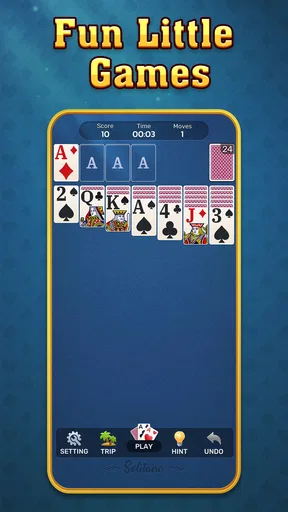
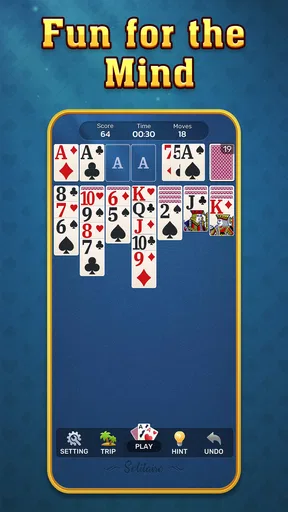
Firing up Solitaire Game: Classic Card for the first time, I was instantly greeted with a clean and intuitive interface. The developers have done a stellar job of keeping things straightforward, which is exactly what you want from a classic card game. The soothing green felt background and crisp card graphics make playing a pleasant experience for the eyes.
One of the things I appreciate about this game is its customizable features. You can change the card backs and backgrounds to suit your mood or style. Plus, the cards are big enough to see without squinting, which is a blessing for those marathon game sessions.
Gameplay and Features
Getting into the gameplay, it’s exactly what you’d expect from a Solitaire game, but with a few added bonuses. You’ve got your classic Klondike Solitaire, with options for both 1-card and 3-card draw modes. For the purists out there, this is the real deal.
The game also includes daily challenges which add a refreshing twist to the traditional gameplay. These challenges are a fun way to keep things interesting and test your skills. Plus, completing them earns you crowns, which is a nice little incentive to keep coming back.
And let’s not forget about the undo and hint features. These are lifesavers when you’re stuck, and they’re implemented in a way that doesn’t feel like they’re holding your hand too much.
Performance and User Experience
I’ve played Solitaire Game: Classic Card on both Android and iOS, and I’m pleased to report that it runs smoothly on both platforms. There were no noticeable lags or crashes, which is crucial for maintaining the flow of the game.
The app is also pretty light on battery consumption, which is a huge plus if you’re looking to play during a long commute or while lounging around without a charger in sight. The ads are minimal and not too intrusive, which is a rare find in free apps these days.
Practical details before you install
ECKERT GAMING develops this free puzzle game, and it has reached over 500,000 installs. Its average rating is 4.8 from around 1,500 ratings, alongside 299 written reviews. Those figures suggest it has found an audience, but I would still judge it by whether its steady Klondike loop fits the kind of break I actually want.
The game is rated Teen and is currently at version 2.6.0. It requires Android 8.0 or later on Android devices. If you are choosing between phone and tablet play, the important practical question is not raw performance so much as whether the cards are comfortable to read and tap on your screen. I would try a short session first and adjust the card and background look before settling into longer rounds.
Because it is free, it is easy to try without committing money, but free play is not the same as a promise of an entirely uninterrupted experience. The existing experience includes ads, described as limited and not especially intrusive; players who are highly sensitive to interruptions should keep that in mind. I would not choose it for a setting where even a brief distraction would be unwelcome.
Choosing the right expectations
If you are new to solitaire, the best way to start is to use one-card draw and resist the urge to optimize every move. First uncover face-down cards when the opportunity is sensible, and pay attention to whether a move opens a useful column or merely shifts cards around. When you hit a dead end, try undo to compare the board before and after a decision; use hints when you genuinely cannot see a route forward. This turns the help tools into a learning aid rather than a substitute for making choices.
For experienced players, the appeal is more about convenience than depth. The familiar rules let you begin almost immediately, while three-card draw and daily challenges offer small variations in how you approach a round. They are enough to refresh a regular habit, but not enough to make the game a replacement for a varied puzzle collection. If you already know Klondike and want new rules, themes of play, or a campaign-like structure, another kind of puzzle game is likely to hold your attention longer.
A realistic use is a short wait at a clinic: I might play a few moves, stop when my name is called, and return to the board if I have another quiet moment. That is where a recognizable layout and an uncomplicated objective help. On a crowded commute, by contrast, I would keep the phone away if I need to stay alert or watch my stop. A game’s ability to occupy spare minutes does not make every spare minute a good time to play.
Final Thoughts
All in all, Solitaire Game: Classic Card is a fantastic homage to the classic card game we all know and love. It manages to stay true to its roots while offering just enough modern features to keep things fresh. Whether you’re a Solitaire veteran or a newcomer, this app is sure to provide hours of entertainment.
For those of us who sometimes just want a simple, relaxing game to unwind with, this app fits the bill perfectly. So, if you haven’t already, give it a download and see for yourself. It might just become your go-to game when you need a quick mental break.
My recommendation is straightforward: try it if you want familiar card play, quick access to a round, and a few gentle ways to vary the routine. Skip it if you need constant novelty, dislike ads, or would rather spend your break away from a screen. I like it most when I choose a small window for it and let the cards provide a calm, low-pressure puzzle rather than expecting a major new take on solitaire.
Pros
- Smooth gameplay with intuitive controls.
- Minimal ads ensure an enjoyable experience.
- Offline mode available for play anywhere.
- Customizable themes for a personal touch.
- Daily challenges keep the game engaging.
Cons
- Limited variety in game modes.
- No multiplayer option available.
- In-app purchases can be pricey.
- Occasional lag on older devices.
- Basic graphics may not appeal to all.
FAQs for Solitaire Game:Classic Card
What are the main features of Solitaire Game: Classic Card?
Solitaire Game: Classic Card offers a timeless card gaming experience with customizable themes and backgrounds, daily challenges, and intuitive controls. It also includes features like hints and undo options to help players refine their skills. The game is designed to provide a smooth and engaging experience for both new and seasoned players.
Is Solitaire Game: Classic Card available offline?
Yes, Solitaire Game: Classic Card can be played offline, allowing you to enjoy your favorite card game without needing an internet connection. This makes it a perfect companion for travel or situations where connectivity is limited, ensuring you can keep playing whenever you want.
Are there in-app purchases in Solitaire Game: Classic Card?
While Solitaire Game: Classic Card is free to download, it may offer in-app purchases for additional themes, ad removal, or other premium features. These purchases are optional and designed to enhance the gaming experience, but players can fully enjoy the core game without spending any money.
How does Solitaire Game: Classic Card handle ads?
The game may feature ads to support its free version. However, these ads are generally non-intrusive and are designed not to disrupt gameplay. Players also have the option to purchase an ad-free version to enjoy uninterrupted gaming. The frequency and type of ads may vary based on the player's region.
Can I track my progress in Solitaire Game: Classic Card?
Yes, the game includes a progress tracking feature where players can view their statistics like win/loss records, streaks, and personal bests. This feature helps players monitor their improvement over time and adds a competitive edge for those looking to beat their previous scores.


